Ansible Task 3
TASK 3 ANSIBLE

Load Balancer
- Load balancing refers to efficiently distributing incoming network traffic across a group of backend servers, also known as a server farm or server pool.
- Modern high‑traffic websites must serve hundreds of thousands, if not millions, of concurrent requests from users or clients and return the correct text, images, video, or application data, all in a fast and reliable manner. To cost‑effectively scale to meet these high volumes, modern computing best practice generally requires adding more servers.
- A load balancer acts as the “traffic cop” sitting in front of your servers and routing client requests across all servers capable of fulfilling those requests in a manner that maximizes speed and capacity utilization and ensures that no one server is overworked, which could degrade performance. If a single server goes down, the load balancer redirects traffic to the remaining online servers. When a new server is added to the server group, the load balancer automatically starts to send requests to it.
In this manner, a load balancer performs the following functions:
- Distributes client requests or network load efficiently across multiple servers
- Ensures high availability and reliability by sending requests only to servers that are online
- Provides the flexibility to add or subtract servers as demand dictates
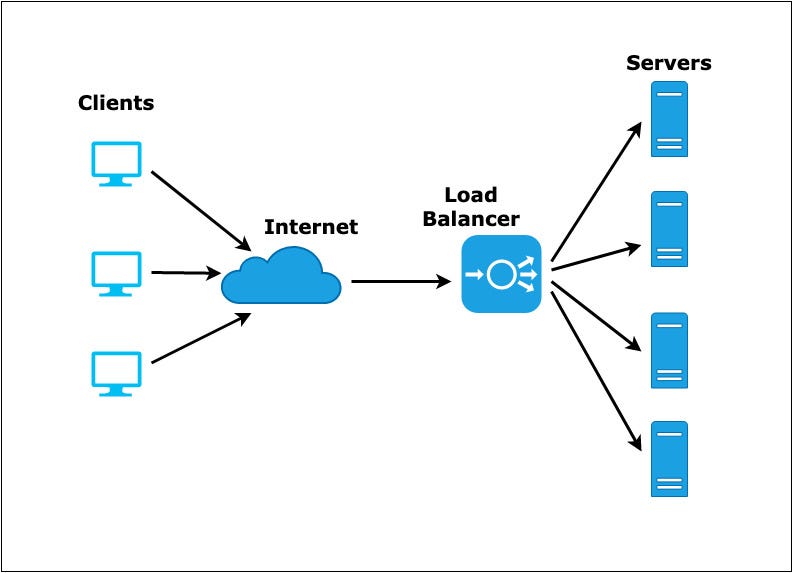 |
| Load Balancing |
Task Descripion
♦️ Provision GCP Instances Through Ansible.
♦️ Retrieve The IP Address of Instances Using The Dynamic Inventory Concept.
♦️ Configure The Web Servers Through The Ansible.
♦️ The Target Nodes of the Load Balancer Should Auto-Update As Per The Status of Web Servers.
Building The Task
- 4 instances are running in GCP

- Download Ansible and install in 1 instance -

- Created inventory


- Now create a User and give sudo powers

- Creating an inventory for IP -

- Run playbook

- transfer key for login in Instance

- load balancer create and set IP & port number -


- Restart the playbook -


- writing a playbook for install as proxy software and managing load balancer


- httpd installed by Playbook

- Run Playbook


- Httpd running and managing load balancing -


Comments
Post a Comment